
Leads and qualification
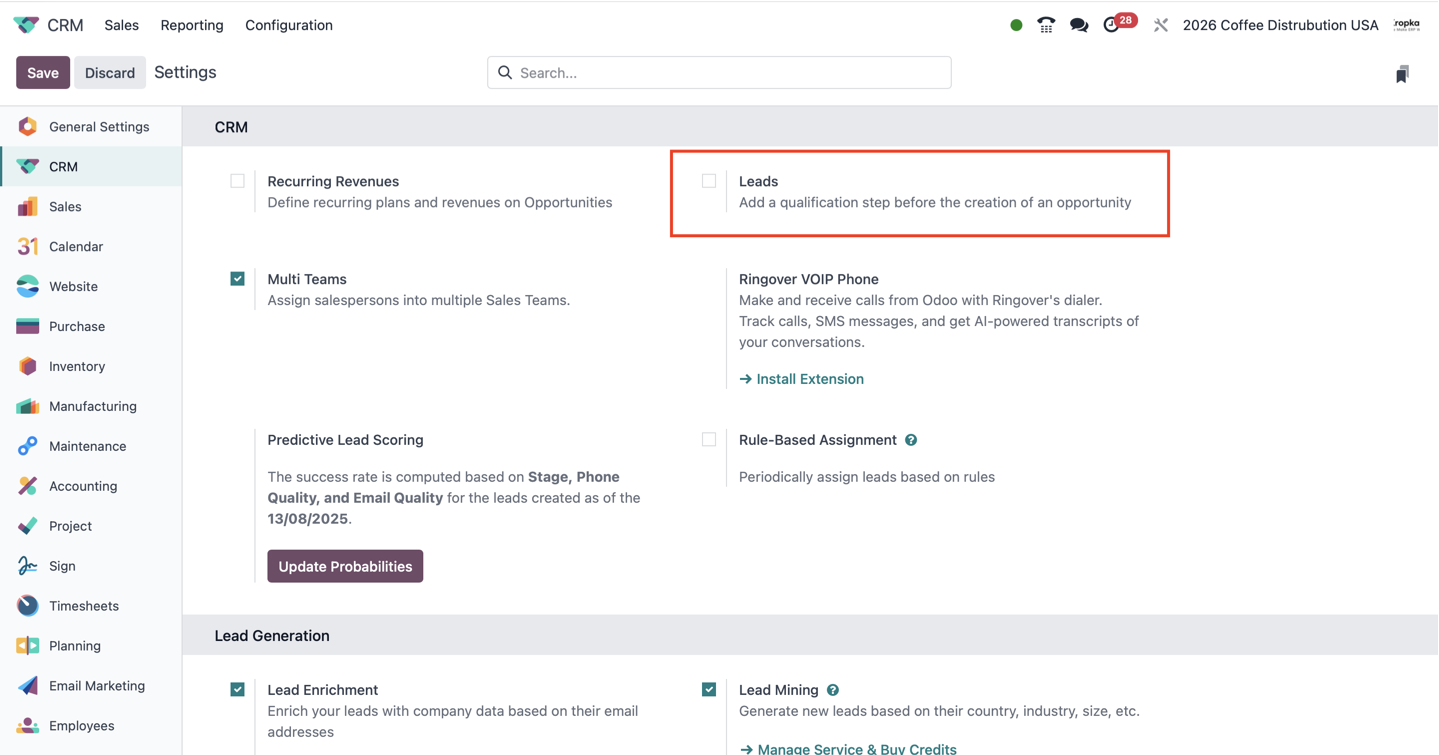
Review incoming enquiries before including them in the active sales pipeline. Enable a separate lead step when advertising, website forms, email or other sources bring enquiries that require screening.
Leads and qualificationOdoo App implementation
Manage customer relationships from the first enquiry to a won sale. ERPixel configures Odoo CRM and connects advertising, customer communication and sales follow-up into one accountable workflow.
Official Odoo Partner
Odoo implementation, development, integration and ongoing support.
Business purpose
Odoo CRM helps teams qualify enquiries, manage potential sales, preserve communication history and plan the next action. It is part of the wider Odoo ERP: a won opportunity can continue into a Sales quotation and order, then delivery, projects and invoicing. We start with how your team sells, then define ownership, qualification, stages and reporting before adding automation.
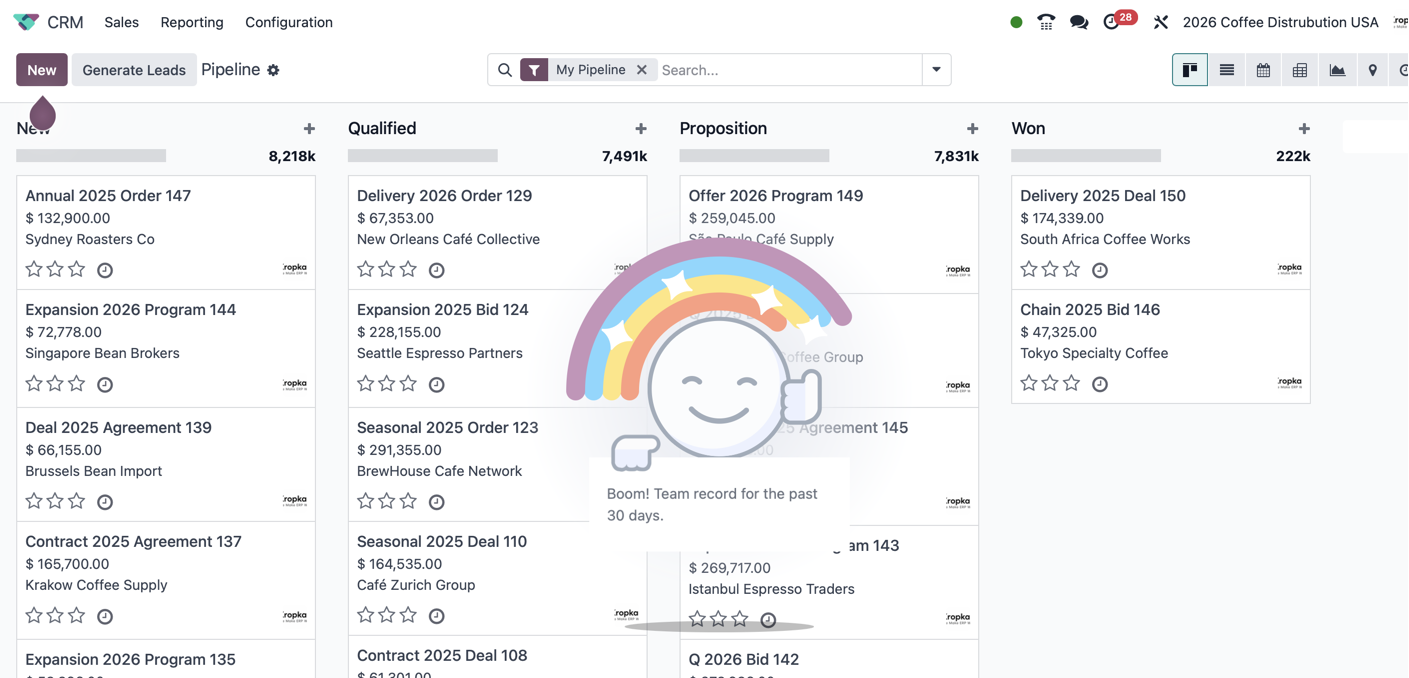
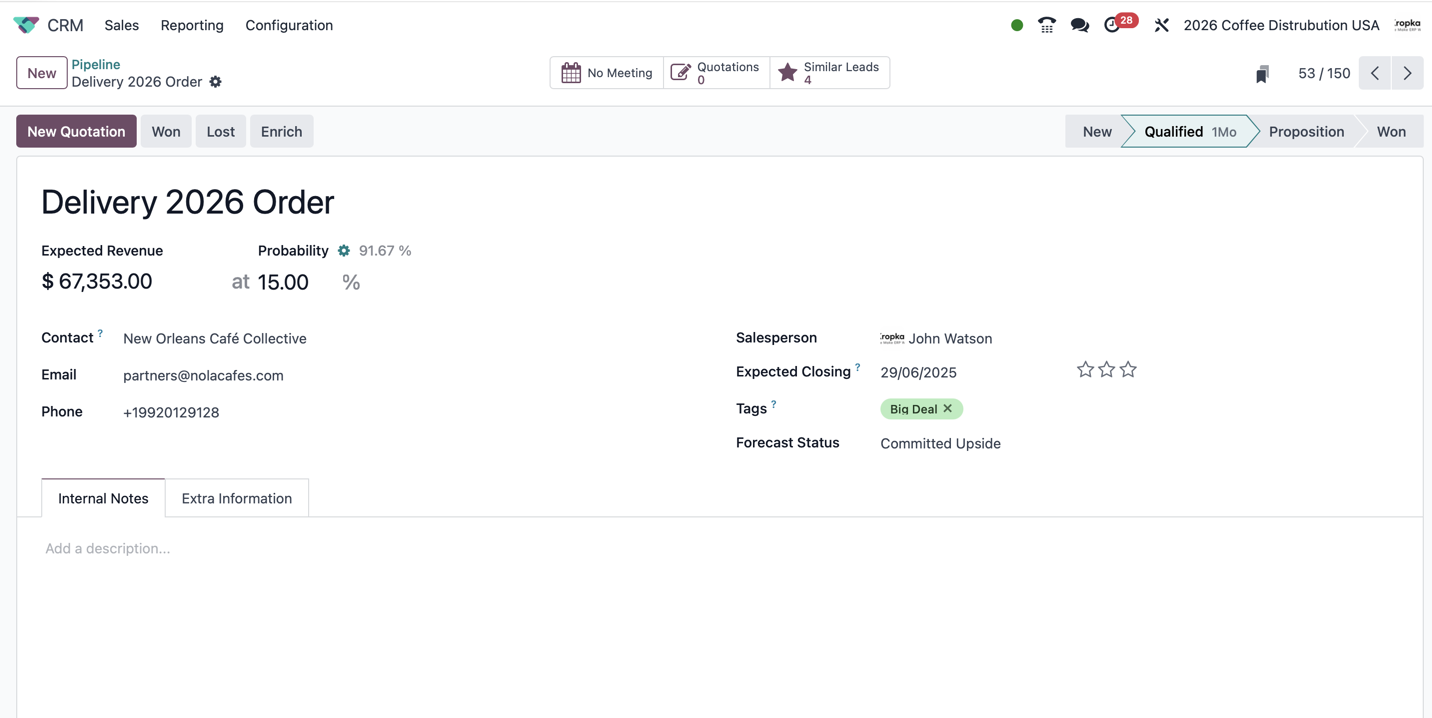
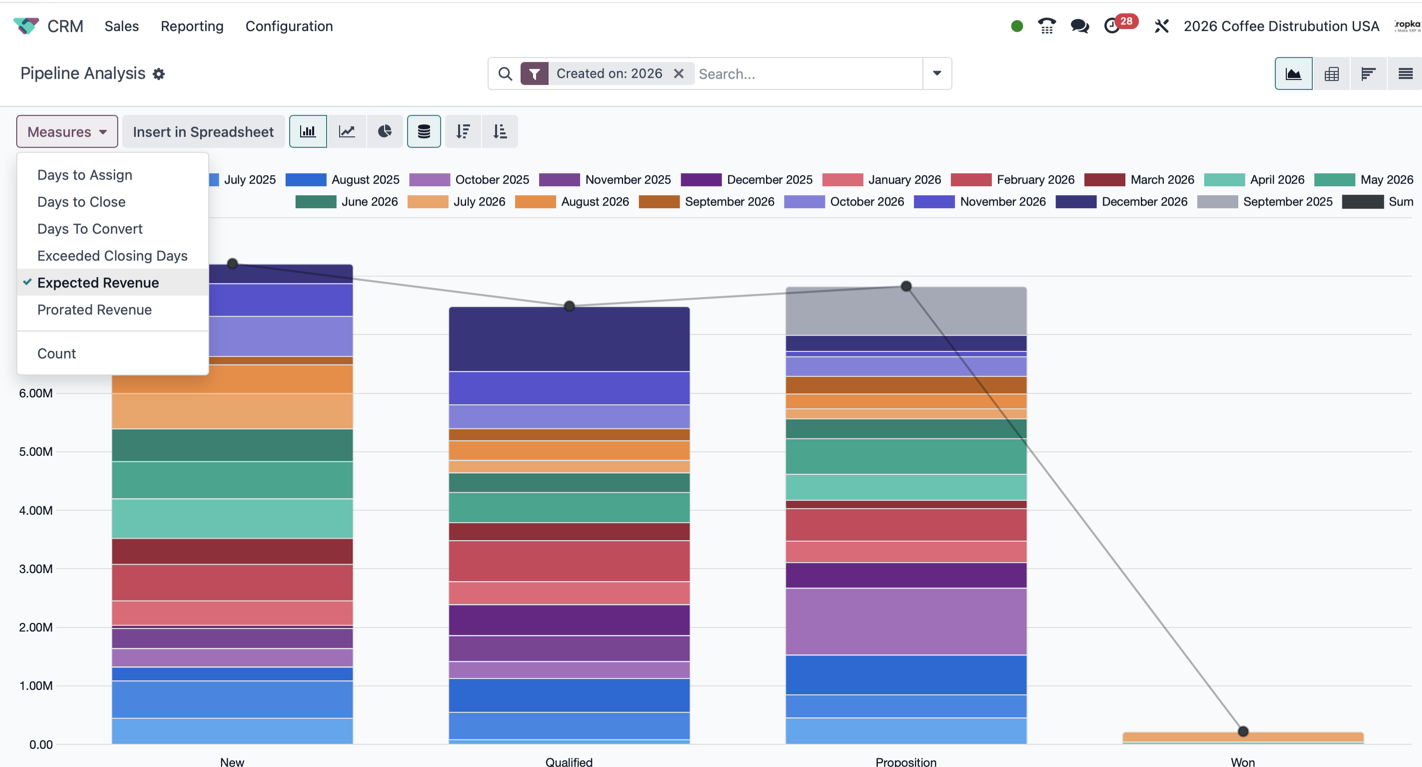
Odoo CRM in practice
Explore opportunity fields, sales stages, reports and configuration in the Odoo interface. The displayed sample records illustrate the interface; fields and available services vary by version and setup.
Key capabilities
Selected capabilities that matter when the app is implemented as part of a real business system.
Review incoming enquiries before including them in the active sales pipeline. Enable a separate lead step when advertising, website forms, email or other sources bring enquiries that require screening.
Leads and qualificationRepresent each potential sale as an opportunity and move it through stages such as Qualified, Preparing Quotation and Waiting for Customer Decision. Stage definitions make pipeline reviews consistent.
Opportunities and pipeline stagesAssign responsibility for every enquiry. Sales teams organise different sales processes, and team-specific stages can distinguish direct customers, partners or other sales motions.
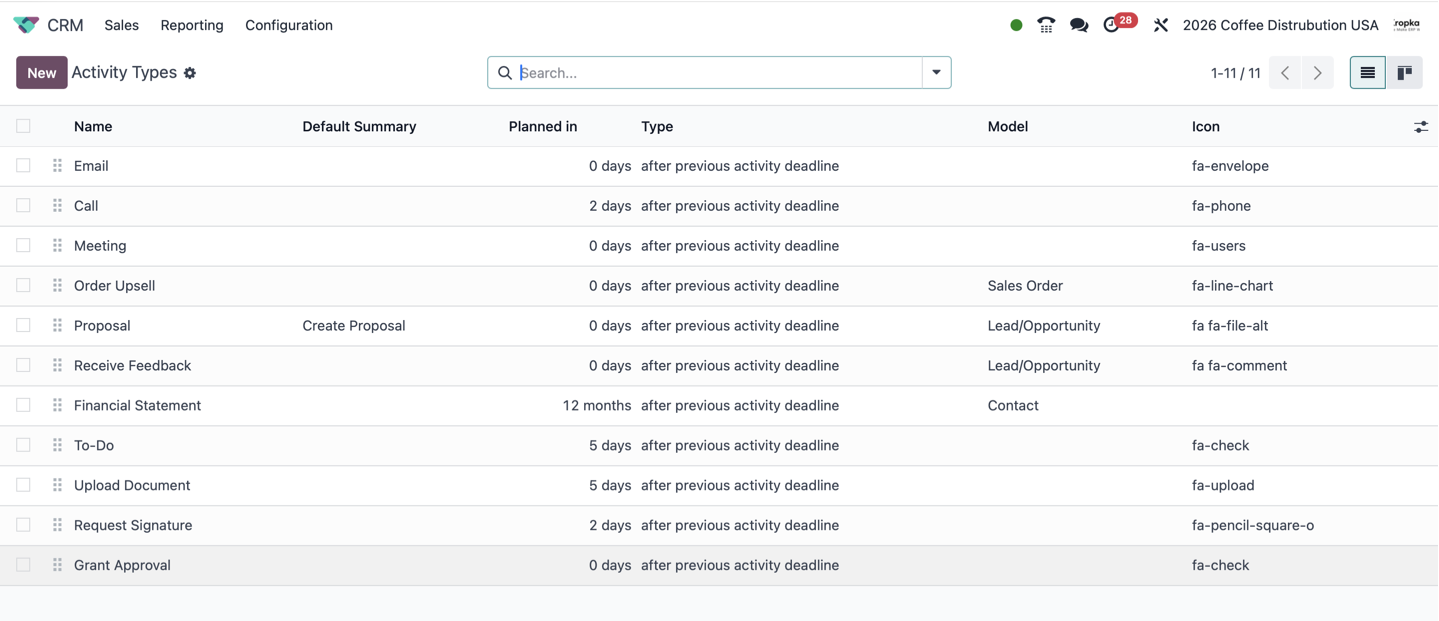
Schedule calls, meetings, demonstrations, proposals and feedback requests with an owner and a due date. Activity types and plans standardise follow-up and make overdue work visible.
Keep email exchanges, internal notes and activity updates connected to the lead or opportunity. Followers and notification settings help colleagues stay informed; external channels need their corresponding integrations.
Chatter and customer historyCreate a quotation from an opportunity when Sales is installed. Several quotations can represent alternative scopes or terms while retaining the link to the original customer conversation.
Quotations linked to opportunitiesRecord the estimated value and expected closing date of each opportunity. These forecasts help managers plan sales and identify dates or amounts that need review.
Estimate the chance of winning using historical CRM data or a manual assessment. Define how the team uses probabilities; weighted revenue is an estimate, not a confirmed sale.
Analyse opportunities by team, stage, source and outcome. Expected and prorated revenue support forecasting; lead-to-opportunity and opportunity-to-won conversion answer different performance questions.
Pipeline, forecast and conversion reportingClose opportunities with a clear outcome and record why business was lost. This keeps the active pipeline current and helps distinguish pricing, timing, fit and competitive issues.
Keep the origin of an enquiry attached to its sales outcome. Campaign information supports acquisition analysis; capturing ad-platform data and sending outcome feedback require configured integrations.
Route incoming enquiries to the appropriate team or salesperson according to configured rules. Automatic assignment supports timely handling while preserving clear ownership.
Standard enrichment can add company information, while lead mining can generate prospective leads using selection criteria. Availability and service credits depend on the configured Odoo services; neither replaces qualification.
Classify opportunities for filtering and review, highlight priorities and examine similar leads before merging. This helps prevent duplicated sales work and fragmented customer history.
Where enabled, track recurring amounts and plans on opportunities. Use this to forecast recurring commercial value; confirmed subscription billing is managed through the relevant Sales and Subscriptions workflow.
Our experience
How we configure customer workflows, connect communication channels and help sales teams follow through.
We configure pipelines, sales teams, qualification criteria, forecast categories and quotation flows. For clients that require formal transfers between teams, we implement a controlled handover button that records responsibility changes.
We connect telephony to the customer workflow so calls, missed-call follow-up and relevant context can be reviewed alongside opportunities and activities. Our FreeSWITCH work covers CRM and support scenarios.
VoIP and connected call historyWe implement call analysis that helps teams review what the customer and salesperson said and identify useful next steps. Our n8n-assisted CRM review reads records and communication context, proposes actions and creates non-duplicating Odoo Activities.
Call analysis and AI-assisted follow-upOur enrichment module gathers business context from company websites, official company sources and European VAT information where relevant. Depending on location and available data, the process can consult around 20 sources.
We connect WhatsApp and SMS to agreed communication workflows, including acknowledgement of a new enquiry and follow-up. Message history is linked to the CRM record where the integration supports it.
We configure reusable customer acknowledgement, follow-up and closing-message templates, activity sequences and quotation templates. Recipients, timing, language and document content follow the agreed sales process.
We register advertising enquiries with available form, company, source, medium and campaign information. Supported qualification and won events can be returned to Meta or Google Ads through the configured integration.
Our author guide follows a customer from an April–July advertising campaign through assignment, communication, qualification, quotation and a won opportunity. It explains the daily CRM work behind these implementations.
Practical experience, explained by the ownerTypical workflow
The exact stages are adapted to the company, but ownership and handovers must remain explicit.
Create a lead from the configured acquisition channel and preserve the request, contact details and source information.
Assign the responsible salesperson, notify the team and send the customer an acknowledgement through the agreed channel.
Record the conversation and establish the company, contact’s role and authority, required purchase and timing. Convert a credible enquiry into an opportunity.
Move the opportunity through defined stages, maintain expected revenue and closing dates, and schedule the next activity.
Create linked quotations in Sales, discuss alternatives and record the customer’s response without losing the communication history.
Mark the opportunity won or lost according to company rules. Analyse campaign outcomes, qualification time and follow-up; external conversion feedback uses the integration.
Implementation considerations
These decisions vary by app and determine whether users receive a controlled workflow or another disconnected tool.
Agree when an enquiry becomes an opportunity and what evidence is needed to enter each stage. Enforcing mandatory transitions may require additional configuration or development.
Decide how direct sales, partners and other teams share or separate records, who receives new leads and when a controlled handover is required.
Review companies, contacts, duplicates and attribution fields. Define the information users must collect before preparing a quotation.
Agree on email, SMS and WhatsApp messages, activity types, follow-up timing and quotation templates. Review customer recipients separately from internal notifications.
Choose how probabilities are used, maintain closing dates and define the business event that means Won. Require useful loss reasons in the working process.
Check Odoo edition and deployment compatibility, provider requirements, recording arrangements and message delivery. Plan retries, logs and duplicate controls for external integrations.
What ERPixel can do
ERPixel starts with the business process, uses standard Odoo where it fits and adds engineering only where the approved scope needs it.
Map the process, define a limited scope, configure roles and workflows, prepare data, test and support go-live.
Consult and implementAdd maintainable fields, logic, reports or modules when a verified requirement cannot be met through configuration.
Customize and developConnect external systems, migrate or upgrade existing solutions, train users and support controlled improvement.
Integrate and improveConnected Odoo Apps
These links explain the operational handovers between apps, not just technical dependencies.
Turn qualified opportunities into quotations and confirmed orders, with reusable quotation templates.
Odoo SalesHand sold services into delivery projects and tasks through the configured sales-to-project workflow.
Odoo ProjectOrganise proposals and customer documents alongside the sales process.
Odoo DocumentsConnect sales and support conversations while keeping ticket ownership distinct from opportunity ownership.
Odoo HelpdeskConnect the confirmed sale to invoicing and payment information. Marking an opportunity won on payment is a configured automation, not a universal default.
Odoo AccountingIntegrations
Integration is included only where it serves the app’s real business process.
Connect calling, missed-call follow-up and call context with CRM records and activities. Scope depends on the existing phone system and required workflow.
VoIP and FreeSWITCHReview communication and opportunity status, propose next actions and create activities with duplicate controls. Agree how recommendations are reviewed by salespeople.
Call analysis and n8n automationConfigure customer acknowledgements and follow-up, message templates and record-linked communication using the selected providers. Availability depends on provider and Odoo setup.
WhatsApp Business and SMSImport available lead and campaign information, then send supported sales outcomes back through the integration. Separate campaign attribution from the dates on which deals close.
Collect public business information and combine acquisition data with pipeline outcomes. Keep Odoo records as the operational reference and define reconciliation with reporting systems.
Industry use cases
Selected industries are based on confirmed ERPixel experience and the app’s role in their processes.
Longer B2B pursuits, qualification of project scope, quotation alternatives and a clear sales-to-project handover.
Separate direct and partner sales, manage product enquiries and carry agreed commercial terms into quotations and fulfilment.
Follow customer requests through defined stages into contracts, bookings or scheduled work, with responsibility and follow-up visible.
ERPixel expertise
ERPixel is an Official Odoo Ready Partner with experience in implementation, development, integrations, migration, training and support. Our work spans standard app setup and complex environments where Odoo connects sales, operations, finance, ecommerce, warehouses and external APIs.
Odoo CRM reading
Explore our author guide and clear glossary definitions before configuring your process.
Understand leads, opportunities, Chatter, quotations, activities and the advertising-to-won journey in detail.
Odoo CRM: the complete author guideCustomer Relationship Management: communication, customer history and accountable follow-up.
CRMAn enquiry or potential customer that has not yet been qualified as a specific sales opportunity.
LeadA potential sale with an owner, estimated value and a position in the sales process.
OpportunityThe share of a defined group that completes a specified step; qualification and won outcomes are different measures.
Conversion RateRead how telephony connects to CRM workflows and what an integration project needs to address.
Odoo VoIP with FreeSWITCHOdoo CRM decisions
The useful answer depends on your process, data, Odoo edition and connected systems.
Odoo includes CRM within a wider ERP platform. CRM manages enquiries, potential sales and follow-up; Sales, Project, Inventory and Accounting handle the connected commercial and operational processes. Read the CRM definition
Use leads when enquiries need screening before they enter the active sales pipeline. If incoming requests are already qualified, a team may work directly with opportunities. We define the qualification criteria around your actual sales process. Understand leads
An opportunity represents a potential sale and its communication history. A quotation is a commercial offer created in Sales. Several quotations can be linked to one opportunity to offer different scopes or terms. Understand opportunities
Yes. We review current stages, ownership, data, permissions, forecasts and follow-up, then separate configuration fixes from integrations and justified development. The review preserves useful existing workflows.
Yes, with the appropriate telephony and analysis integration. ERPixel connects calls and customer context and implements call analysis and AI-assisted follow-up. Phone-system compatibility, recording and the desired call workflow determine the scope. Read our FreeSWITCH guide
We configure these channels through supported providers and integrations, including acknowledgement and follow-up templates. Delivery, conversation logging and automation depend on the channel, provider and Odoo environment.
It gathers public business information from company websites, official sources and VAT information where relevant. Depending on the company and available data, our workflow can consult around 20 sources. This adds context for qualification; it does not guarantee a sale.
Yes. We configure acknowledgement, follow-up and closing messages, activity types and sequences, and quotation templates in Sales. We agree the language, recipients, timing and conditions before automating delivery.
Our configured integrations can return supported conversion events and preserve source, medium and campaign information in Odoo. Available events and their optimisation use depend on the advertising platform. Stock lead conversion alone does not send external feedback.
Define the starting population, target action and observation window. Lead-to-opportunity conversion and opportunity-to-won conversion answer different questions. A campaign cohort may produce purchases after the campaign ends; probability is not the same as observed conversion. See the formula and examples
Yes. Responsibility can be reassigned, with notifications configured around that change. When a formal transfer is required, ERPixel implements a controlled handover action that records the transfer between teams.
Core lead and opportunity workflows exist in both editions. ERPixel integrations support both with the appropriate deployment and configuration. Communication apps, enrichment services and reporting options still need an edition and version check. Read our practical CRM overview
Yes. Scope can include data preparation and test migration, workflow-based training, go-live preparation and support. We train users on their actual stages, activities, templates and responsibility rules.
Odoo CRM project
Discuss a new implementation, an integration, a focused customization or an existing Odoo workflow that needs improvement.