
What is CRM? Is Odoo a CRM system? And how do the main records in Odoo CRM actually work?
In this article, I will explain leads, opportunities, quotations, and activities, and share my experience of using and implementing Odoo CRM. I will also discuss the settings I believe every beginner should understand before starting to work with customers.
Then we will follow one customer through the entire process: from an advertising enquiry registered as a lead to a qualified opportunity and, finally, a won deal.
For me, CRM is useful when it helps a team answer practical questions: Who are we talking to? What does this customer want? What have we promised? Who needs to act next? And what business can we realistically expect from our current pipeline?
The workflow I describe is based on our work with Odoo Enterprise. The core lead and opportunity concepts also apply to Odoo Community. I will distinguish the CRM workflow from the integrations and automation we implement at ERPixel.
What Is CRM?
CRM stands for Customer Relationship Management. It covers how a company manages its relationships with customers.
A relationship includes much more than a name, an email address, and a phone number. It includes the history of your communication:
- When the customer first contacted you and what brought them to your company.
- What you told the customer and what they told you.
- Which documents and proposals you exchanged.
- What you agreed to do next.
- Who is responsible for the next action and when it should happen.
- Whether those actions were completed on time.
Quotations, customer documents, meeting notes, and follow-up tasks all contribute to that relationship. So do the customer’s original enquiry, their responses, and the information you collect while discussing their needs.
A CRM module brings this information together so that communication does not depend entirely on a salesperson’s memory or personal inbox.
Is Odoo a CRM System?
Odoo includes a CRM application, so you can use it as a CRM system. However, describing the whole platform as “a CRM” does not reflect its full scope.
Odoo is an ERP platform. Alongside CRM, it includes applications for sales, inventory, manufacturing, accounting, and other business operations.
CRM manages the relationship and the potential sale. Other applications help the business deliver what it has sold, manage stock, manufacture products, issue invoices, and record financial transactions.
As a rough way of explaining the difference, I sometimes describe customer communication and relationship management as 20% of the picture, with the remaining 80% covering the wider ERP processes. This is an illustration of scope, rather than a measured breakdown of Odoo’s functionality.
The distinction matters. When evaluating Odoo, you should consider both the CRM functionality you need today and the business processes you may want to connect to it.
Now let us look at the main concepts using Odoo’s own terminology.
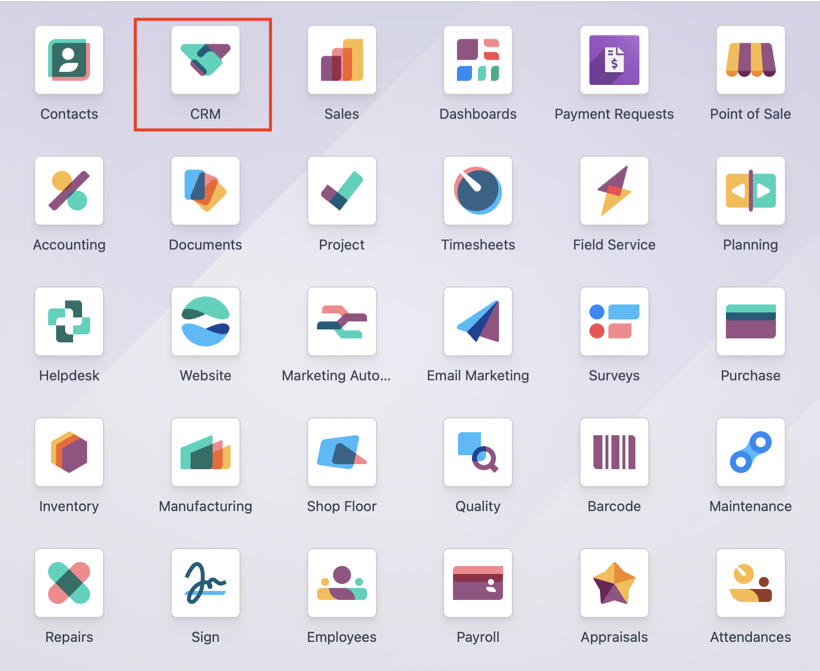
Opportunity: A Potential Sale
An opportunity is a potential sale to a customer.
The customer has not necessarily agreed to buy yet. However, you already understand enough about the enquiry to treat it as a sales opportunity: who the customer is, what they are interested in, how to contact them, and where you are in the conversation.
You may also know the customer’s legal entity, the contact person’s position, and their role in the purchasing decision.
The opportunity record helps you track:
- The potential sale and its expected value.
- The customer and relevant contacts.
- The salesperson responsible for the opportunity.
- The current stage of the sales process.
- The expected closing date.
- Communication, quotations, and follow-up activities.
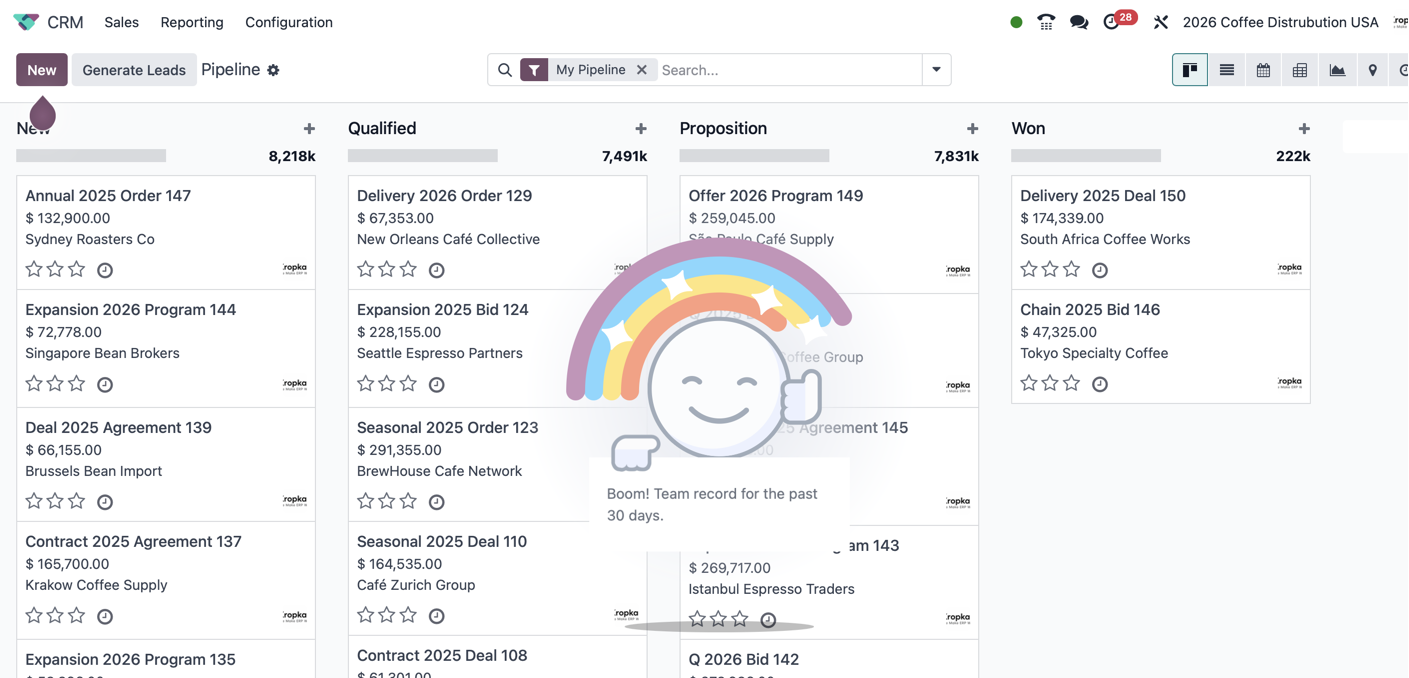
Together, your open opportunities form your pipeline.
A pipeline should help you understand whether you are waiting for information from the customer, whether the customer is waiting for you, and what needs to happen before the sale can move forward.
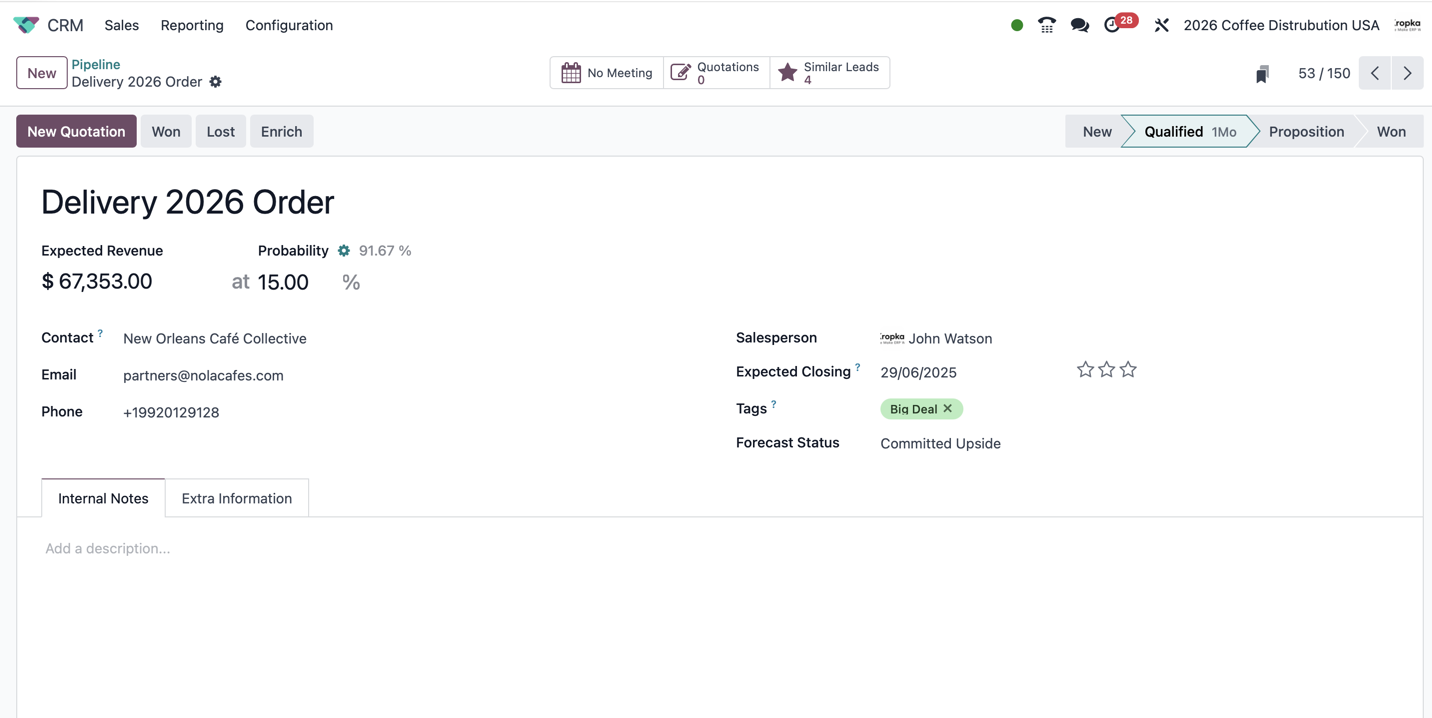
Opportunity Name
Give an opportunity a meaningful name.
In my experience, the name should make sense to the customer as well as to the sales team. Depending on your email workflow and templates, the opportunity title may appear in customer-facing communication, including the email subject.
Avoid names that are useful only internally. A clear description of the customer’s request makes the record easier to recognise and the communication easier to follow.
Customer and Contact Information
Identify both the business you are dealing with and the person involved in the opportunity.
Ideally, you should know who initiated the conversation, who evaluates your offer, and who makes the decision. These may be different people.
The exact way you organise companies and their contacts belongs to a wider discussion about Odoo Contacts. For CRM purposes, the important point is to keep the relevant customer and contact information clear.
Collect the information that helps your team communicate effectively: email, phone number, website, relevant social media profiles, and useful business details.
At ERPixel, we have developed a customer enrichment module that gathers information from public sources. Its purpose is to give the salesperson a clearer picture of the business behind an enquiry and make communication from the CRM record more effective.
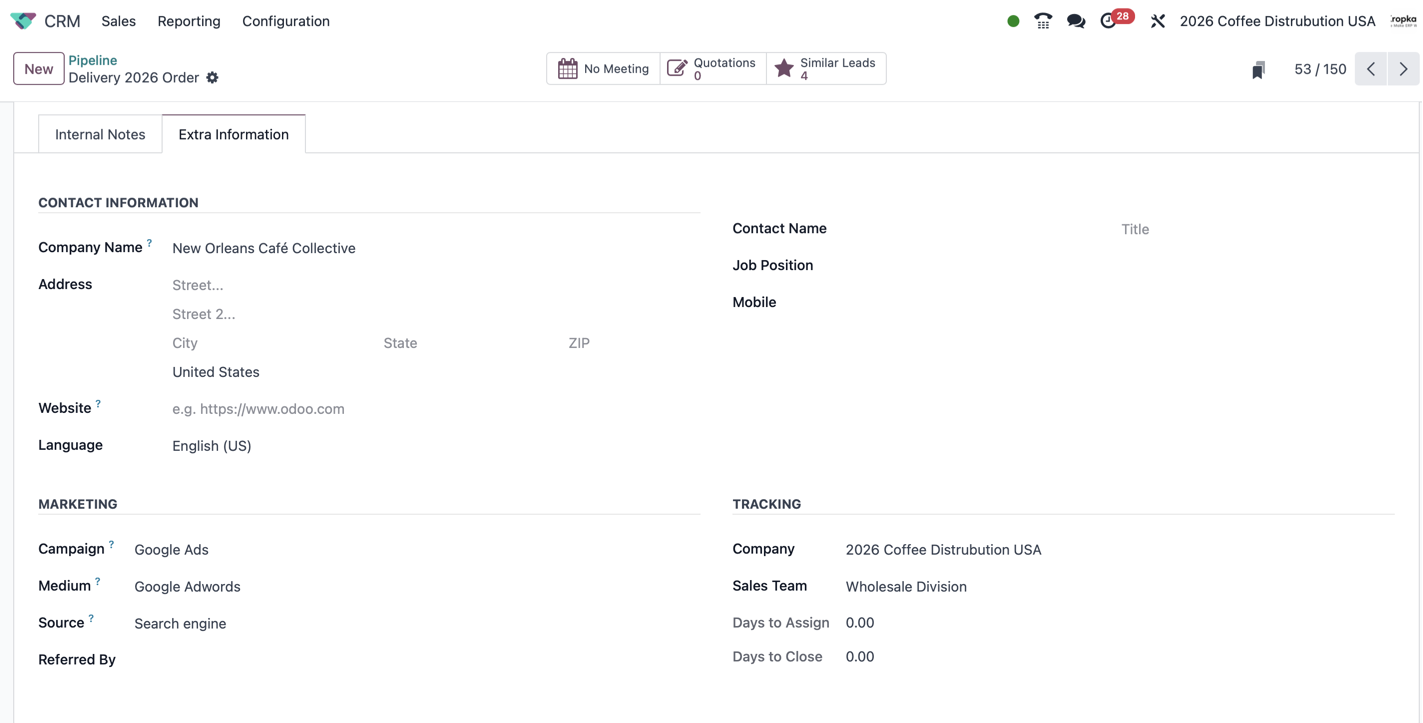
Salesperson: Who Is Responsible?
The Salesperson field identifies the person responsible for working with the lead or opportunity.
For a beginner, this is an important distinction: a record being visible in Odoo does not, by itself, tell your team who should act on it. Assignment establishes ownership.
In the workflows we implement, we can assign the salesperson automatically when a new lead arrives and notify that person that the enquiry needs attention.
Ownership can also change. You can transfer a lead or opportunity from one salesperson to another, for example when a colleague takes over an account or the enquiry needs a different specialist.
Assignment changes should be supported by clear internal communication. Odoo’s notification mechanisms can be configured around these changes so that the relevant people know who is now responsible.
For some clients, we implement a controlled handover process with a dedicated button. The action records the transfer explicitly, for example from one sales team to another.
This is particularly useful when different teams work with customers through different flows and the handover must be reliably recorded. Changing the responsible person and formally handing work over are related actions, but a controlled transfer may require additional information and automation.
Expected Closing Date and Expected Revenue
Two important forecasting fields are Expected Closing and Expected Revenue.
They answer two questions:
When do we expect to close this opportunity, and what value do we expect it to generate?
These are estimates. Nevertheless, they are essential for sales planning.
A useful sales plan should connect to actual opportunities. Which deals might close before the end of the year? Which are more likely to close next year? What value do we expect from each of them?
When management reviews the next quarter’s pipeline, these fields provide a starting point for that discussion.
They also need maintenance. An expected closing date that has passed without being reviewed no longer provides a useful forecast.
Probability and Weighted Revenue
Odoo includes a Probability field. Its predictive lead scoring can estimate the likelihood of winning a lead or opportunity using historical CRM data. Users can also enter a probability manually. Odoo documentation: predictive lead scoring
I would not treat the percentage as unquestionable evidence that a deal will close.
My recommendation is to decide how your company will use probabilities. Your team should understand whether the value comes from Odoo’s predictive scoring or a manual assessment, and how that assessment relates to your sales process.
If you use your own weighting policy, define it consistently so that probabilities reflect the way your company evaluates opportunities.
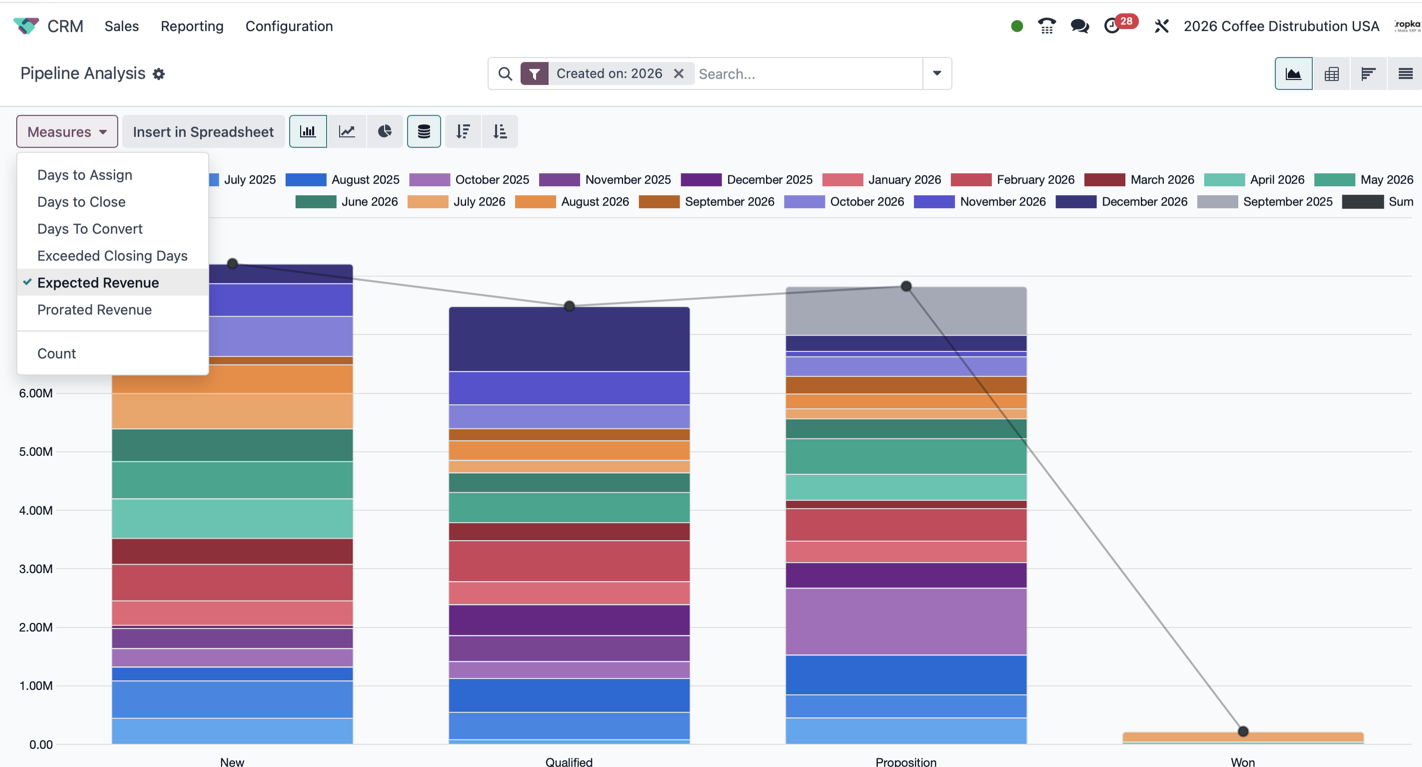
Probability helps estimate weighted revenue, also described as prorated revenue:
Expected revenue × probability of winning
For example, an opportunity worth €20,000 with a 50% probability contributes €10,000 to the weighted forecast.
That does not mean the customer will pay €10,000. The opportunity may close for its full value or be lost. The weighted figure helps estimate the potential outcome across a group of opportunities.
If you have 600 open opportunities with different values and probabilities, looking only at their total expected revenue gives you a very optimistic view. A weighted forecast provides another perspective, provided the underlying data is credible.
It helps answer a practical planning question: considering that some opportunities will be won and others lost, what revenue might we expect in the next six months?
Marking an Opportunity as Won or Lost
An opportunity should eventually reach an outcome.
Mark as Won
Marking an opportunity as Won records that the sale has been successful.
Your company should define what “successful” means. Is it the customer’s agreement, acceptance of a quotation, a signed contract, a confirmed order, or receipt of payment?
That definition should be consistent across the team.
At ERPixel, we often automate this step around an agreed business event. For example, a company may want an opportunity marked as won when the customer’s payment arrives in its bank account. This requires an implemented workflow connecting the relevant records.
The opportunity is shown as won, and the outcome becomes available for reporting. Relevant lifecycle dates also support analysis of how long the sales process took, from the creation and qualification of the enquiry to its successful conclusion.
This allows you to review which opportunities were won, when they were won, and the information and sales work that preceded the outcome.
Mark as Lost
An opportunity should be marked as Lost when the customer declines or the team decides there is no longer an active sales opportunity.
I strongly recommend recording a meaningful reason and making this part of your company’s working rules.
“Lost” tells you the outcome. The reason helps you understand it: the customer had no budget, selected another supplier, postponed the project, or needed something outside your scope.
Where appropriate, I also recommend sending a clear closing message to the customer. This can confirm that you are closing the current enquiry while leaving room for future contact.
Closing inactive opportunities keeps the pipeline useful. The active pipeline should represent current potential business, rather than every conversation the company has ever had.
It also helps you compare outcomes by source, campaign, team, and loss reason. Which channels bring enquiries that become won deals? Which tend to produce enquiries that are eventually lost?
Creating Quotations from an Opportunity
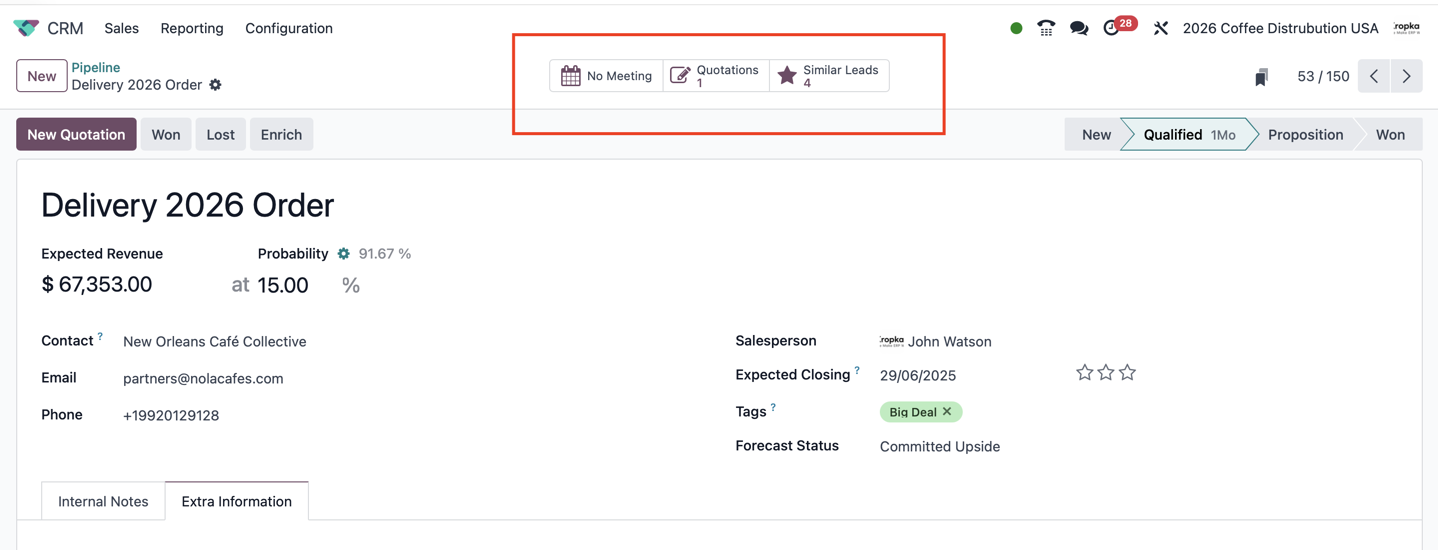
When a customer asks for pricing, you can create a quotation from the opportunity using New Quotation, with the relevant Sales functionality installed.
Odoo carries customer information into the quotation and links it to the opportunity. This connects the CRM conversation with the commercial document managed in Sales. Odoo documentation: quotations from CRM
The quotation therefore retains a connection to the opportunity that led to it. The salesperson can move between the potential sale in CRM and the proposed commercial terms in Sales.
One opportunity can have several quotations.
For example, you might offer different scopes, alternative products, different discounts, or different delivery arrangements. One option could include delivery at your expense, while another could leave delivery costs with the customer.
The linked documents allow the team to review what was actually offered and how the proposal developed.
I also find quotation activity useful when reviewing a salesperson’s work. How many proposals did they prepare? Which opportunities progressed? Which were won or lost?
These figures provide context, although the number of quotations alone does not tell you whether the sales work was effective.
Stages: Where Are We in the Conversation?
A stage describes the current step in your sales process.
A typical flow might be:
New enquiry → Qualified → Initial meeting completed → Preparing quotation → Waiting for customer decision → Contract signing → Won
Your stages should reflect the way your company actually sells.
The most important part is defining the conditions for moving an opportunity between stages. What makes an opportunity qualified? When is it ready for quotation preparation? What must happen before it moves to contract signing?
Write those rules down.
Otherwise, two salespeople may use the same stage to mean different things, making pipeline reports difficult to interpret.
Stages help you group opportunities and compare their expected value. Looking at the pipeline by stage makes it easier to understand where potential revenue is concentrated and what needs to happen next.
They are also useful foundations for automation. If you need to enforce mandatory steps or prevent a transition until certain information is complete, that requirement needs appropriate configuration or customisation; creating a stage alone does not enforce it.
In our experience, one particularly useful stage is Waiting for Customer Decision, also described as Waiting for Customer Review.
A large part of the pipeline can sit at this point. Making it visible helps the team distinguish between work that still needs to be prepared internally and proposals already awaiting a customer’s response.
Lead: An Enquiry That Has Not Yet Been Qualified
A lead is an enquiry or potential customer record that has not yet been qualified as a sales opportunity.
An enquiry may look promising, but you do not yet know enough to include it in your active sales pipeline.
The person may be unsure about what your company offers. They may have no budget, be researching options, or be contacting you about something unrelated to a purchase, such as a job application.
Separating leads from opportunities allows the team to assess these enquiries without mixing them with qualified potential sales.
In Odoo, leads and opportunities use the same underlying CRM record model, distinguished by their type. Conversion moves the record into the opportunity workflow rather than requiring the salesperson to start the customer history again.
What Can You Do with a Lead?
You can record communication, schedule activities, and qualify the enquiry.
Email communication can be managed around the CRM record. Other channels, such as SMS, telephony, and WhatsApp, depend on the applications, providers, and integrations configured in your system.
You can also mark a lead as lost. For example, the enquiry may be irrelevant or the person may not respond after your agreed follow-up process. As with opportunities, I recommend recording the reason.
When the enquiry meets your qualification criteria, use Convert to Opportunity. It then becomes part of the sales pipeline and follows the process defined for the relevant sales team.
What Does Qualification Mean in Practice?
In our work, qualification means that we have established who the customer is and what they intend to buy.
We know the legal entity, the contact person’s position in the company, and their authority in the purchasing process. We also understand what they want to purchase and when they are ready to do it.
This gives the salesperson a basis for treating the enquiry as a potential sale.
You could think of Convert to Opportunity as a qualification action. The button is named after what happens to the record, but the business meaning is that the team has qualified the customer and their request.
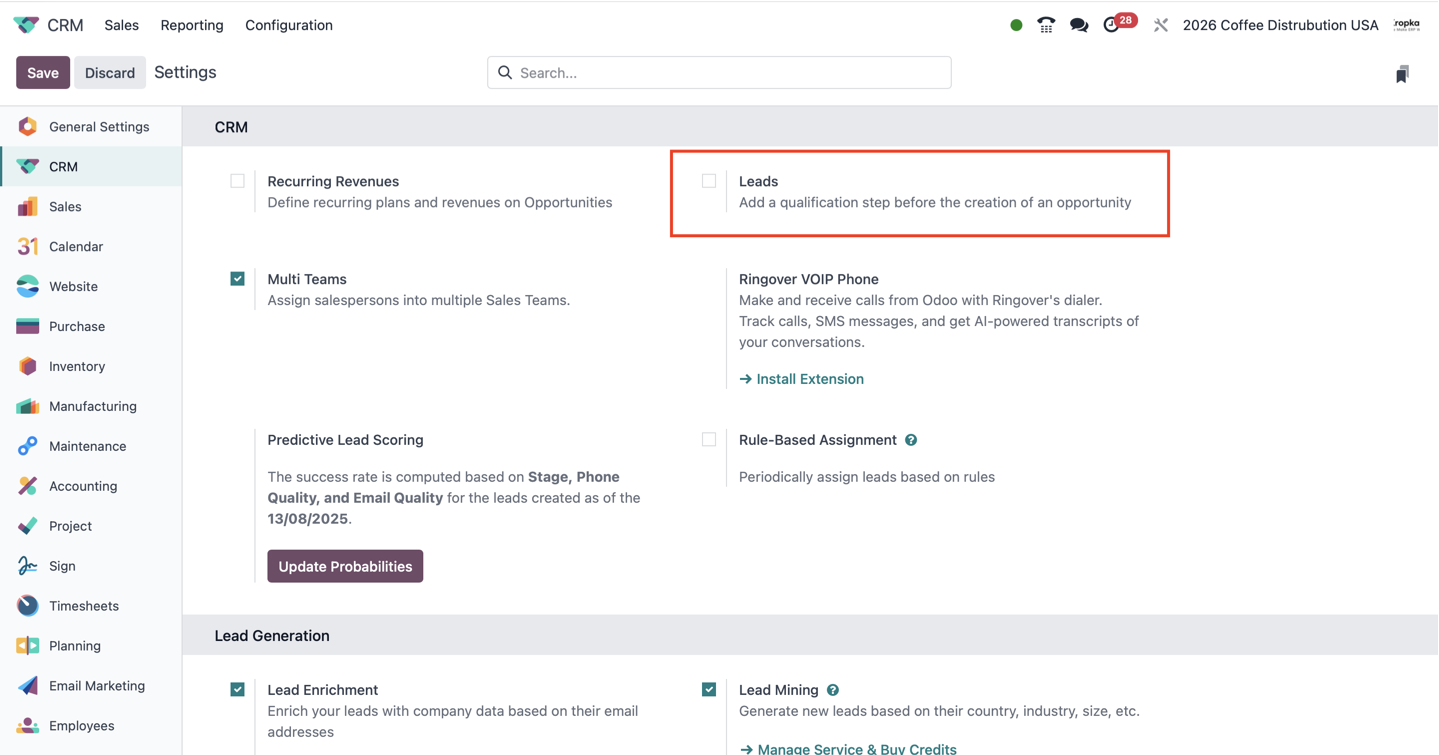
Do You Need Leads?
Decide this before your team starts using CRM.
If almost every incoming enquiry is already a qualified potential sale, you may be able to work directly with opportunities.
If you receive a large volume of enquiries that need screening, a separate lead qualification step is useful.
In my experience, this is especially relevant for enquiries coming from social media and paid advertising. It can also apply to website forms, incoming emails, events, and other sources.
The deciding factor is whether an enquiry needs qualification before entering the opportunity pipeline.
Chatter: The Communication History Inside the Record
The lead or opportunity contains a communication thread, commonly called Chatter.
This is where the team can follow the history around the record: messages, internal notes, and relevant activity updates.
When you send an email to the customer from the lead record, the message becomes part of that thread. With the email setup working correctly, the customer receives it in their inbox and their reply can return to the same conversation in Odoo.
For a beginner, it is useful to distinguish three actions:
- Send a message: communicate with the customer or other recipients. Check the recipients before sending.
- Log an internal note: record information for colleagues without treating it as a customer-facing email.
- Schedule an activity: assign work that someone needs to complete.
Followers help relevant people stay informed about updates to the record, subject to access rights and notification settings.
In the integrated workflows we implement, communication through SMS, WhatsApp, and telephony is also recorded against the lead or opportunity. This allows the team to see when contact took place, how many times they communicated, and what the conversation covered.
Recording these channels requires the corresponding integrations. The objective is to keep the customer history together.
If our call analytics module is connected, the record can also contain information about how the conversation went: what the customer said, what the employee said, and useful findings from the call.
When the lead becomes an opportunity, the communication history remains available. The salesperson can continue the conversation with its existing context.
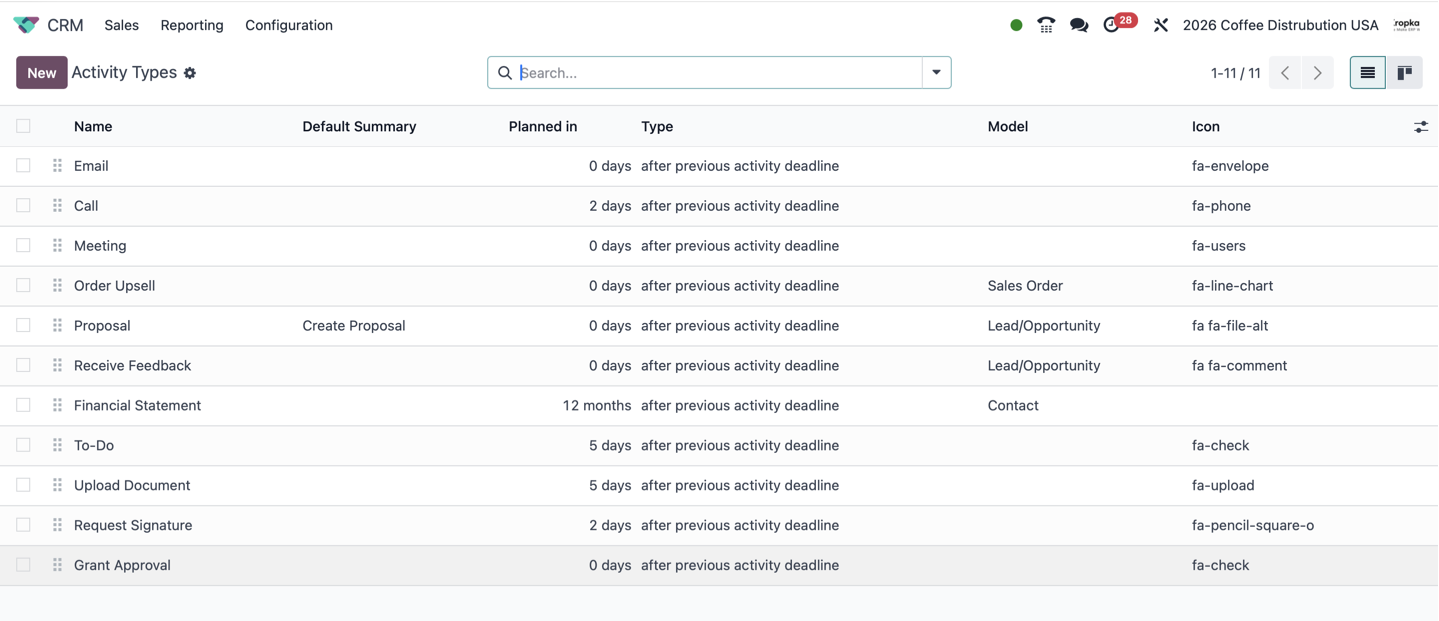
Activities: Turning Communication into Action
An activity is a follow-up task linked to a record.
In CRM, that record is usually a lead or an opportunity. Activities can also be used with other Odoo records, including customers, sales documents, and invoices.
Typical CRM activities include:
- Calling the customer back.
- Requesting feedback.
- Preparing a quotation.
- Arranging a demonstration.
- Following up after a meeting.
An activity should make the next action clear: what needs to happen, who is responsible, and when it is due.
Activity types help organise this work. Consistent types and follow-up sequences also make it easier to review how the team works with customers.
Which actions are being completed? Which are overdue? What sequence does the team normally follow? Where do opportunities stop progressing?
This is useful when developing a repeatable customer communication process or sales script.
The more clearly you define the process, the more useful this information becomes. You can review which activities the team performs, which it misses, and which approaches appear to support better sales outcomes.
At ERPixel, we have implemented AI-assisted activity workflows to help salespeople work more effectively. These solutions review activity execution and suggest alternative actions intended to improve conversion.
This is part of our implementation work and should be distinguished from the basic activity functionality available in Odoo.
One Customer’s Journey: From Advertising Lead to Won Opportunity
Let us put these concepts together.
Imagine that you run an advertising campaign from April to July. Over those months, it generates a number of enquiries.
We will follow one of those customers through the workflow we configure.
Step 1: The Customer Submits an Enquiry
The customer responds to an advertisement and submits a form.
Through the configured integration, Meta or the relevant Google Ads acquisition flow sends the enquiry data to Odoo, and a new lead is created automatically.
We populate the record with the information available from the enquiry and its source:
- The customer’s submitted form and contact details.
- Company information supplied or gathered.
- The advertisement that generated the enquiry.
- Source, medium, and campaign information.
The result is a lead with useful context. The salesperson can see both what the customer requested and how they reached the company.
Step 2: A Salesperson Is Assigned
We automatically assign a sales manager to the new lead.
The Salesperson field now identifies who is responsible for the enquiry.
That salesperson receives a notification explaining that a new lead has been created and needs attention.
In practice, we often add another notification channel, such as Telegram, so that the sales team is less likely to miss a new enquiry. The additional channel is part of the configured workflow.
Step 3: The Customer Receives an Acknowledgement
We also configure an automatic acknowledgement to the customer.
The message confirms that the company has registered the enquiry and will contact them shortly.
Depending on the implementation, this can be sent by email, SMS, WhatsApp, or a combination of channels.
The business purpose is simple: the customer should know that their request has arrived and that someone will respond.
Step 4: Communication Starts from the Lead Record
The salesperson begins the conversation from the lead card.
They can send an email directly from Odoo. The customer receives it, and the communication is retained in the record’s mail thread.
With the relevant integrations connected, SMS messages, WhatsApp conversations, and phone interactions are also recorded against the lead.
The team can review when communication took place, how often the customer was contacted, and what was discussed.
If our call analytics module is installed, they can also review the customer’s statements, the salesperson’s responses, and useful information identified during the conversation.
Step 5: The Salesperson Qualifies the Enquiry
During the conversation, the customer explains what they want to buy and indicates that they are ready to move forward.
The salesperson establishes which company they represent, what position they hold, and what authority they have. They clarify the intended purchase and its timing.
Now the enquiry meets the company’s qualification criteria.
The salesperson selects Convert to Opportunity.
This is the business transition from an unqualified enquiry to a qualified potential sale.
Step 6: The Record Moves into the Pipeline
The record leaves the lead list and appears in the opportunity pipeline.
Its communication history remains available, and the team continues working from the same business context.
The conversion also provides lifecycle information for analysing the movement from lead to opportunity. Relevant date fields allow reporting on when qualification happened and how long it took, although these fields may not all be visible on the everyday form.
In our integrated workflow, we also send a supported qualification event back to Meta or Google Ads.
The purpose is to give the advertising platform feedback about which enquiries became useful to the business, where that signal is supported and configured for optimisation.
This feedback is provided by the integration; converting a lead in an otherwise unconnected Odoo database does not send it automatically.
Step 7: The Opportunity Progresses Through the Sales Flow
The salesperson moves the opportunity through the stages defined by the sales team.
They may hold a meeting, prepare a quotation, discuss revisions, and then move the opportunity to Waiting for Customer Decision.
Communication continues, and the record retains the history. Activities show the next action and its owner.
If another salesperson or team needs to take over, responsibility can be reassigned. Where a formal handover is required, we use the controlled transfer process to record that event.
Step 8: The Customer Accepts and the Opportunity Is Won
The customer accepts the commercial proposal.
Once the company’s agreed condition for winning has been met, the salesperson selects Mark as Won, or the configured automation performs that action.
The opportunity now has a successful outcome.
The company can analyse how many opportunities were won during a period and which advertising campaigns originally brought those customers.
For the April-to-July campaign, this distinction matters: a customer acquired during that campaign may purchase later. Keeping campaign attribution and sales outcome information connected helps the company understand what the campaign eventually produced.
Reporting: What Should You Be Looking At?
CRM reporting should help you connect incoming enquiries, sales work, and commercial outcomes.
The questions I want to answer include:
- Which channels brought us leads?
- How many leads became opportunities?
- How long did qualification take?
- What opportunities are currently open?
- When do we expect them to close?
- What expected and weighted revenue do they represent?
- Which opportunities were won or lost?
- Which campaigns brought the won opportunities?
- What follow-up work did the sales team perform?
Odoo provides CRM reporting tools, including pipeline and forecast analysis. The exact reports, fields, and available views depend on your version, installed applications, and configuration.
Lead conversion and sales cycle analysis become particularly useful when the enquiry’s original creation, qualification, and outcome are recorded consistently.
Conversion rate measures the proportion of a defined group that completes a specific step. Lead-to-opportunity conversion and opportunity-to-won conversion are different measures. For example, 40 opportunities from 100 leads represent a 40% lead-to-opportunity conversion rate. Keep the same cohort and observation window when comparing campaigns, especially when customers purchase after the campaign has ended.
The practical point is that reporting depends on how the team maintains the records. Missing sources, outdated closing dates, inconsistent stages, and incomplete loss reasons reduce the value of the analysis.
The Settings I Recommend Reviewing First
If you are implementing Odoo CRM yourself, start by deciding how your team will work. Then configure the system around those decisions.
1. Decide Whether to Use Leads
Determine whether you need a qualification step before an enquiry becomes an opportunity.
Define the criteria for conversion. A lead should become an opportunity because the team has established a credible potential sale.
If you receive enquiries from social media or advertising, consider how they will enter Odoo, who will qualify them, and what information must be preserved.
2. Define Your Stages
Keep your pipeline focused on stages your team uses regularly.
Avoid adding stages for occasional situations that do not represent a meaningful step in the sales process.
For each stage, define its purpose and the evidence required to enter it. Pay particular attention to where responsibility lies: are you preparing something, or are you waiting for the customer?
In our work, Waiting for Customer Decision has been particularly valuable because it makes a common situation visible and easy to review.
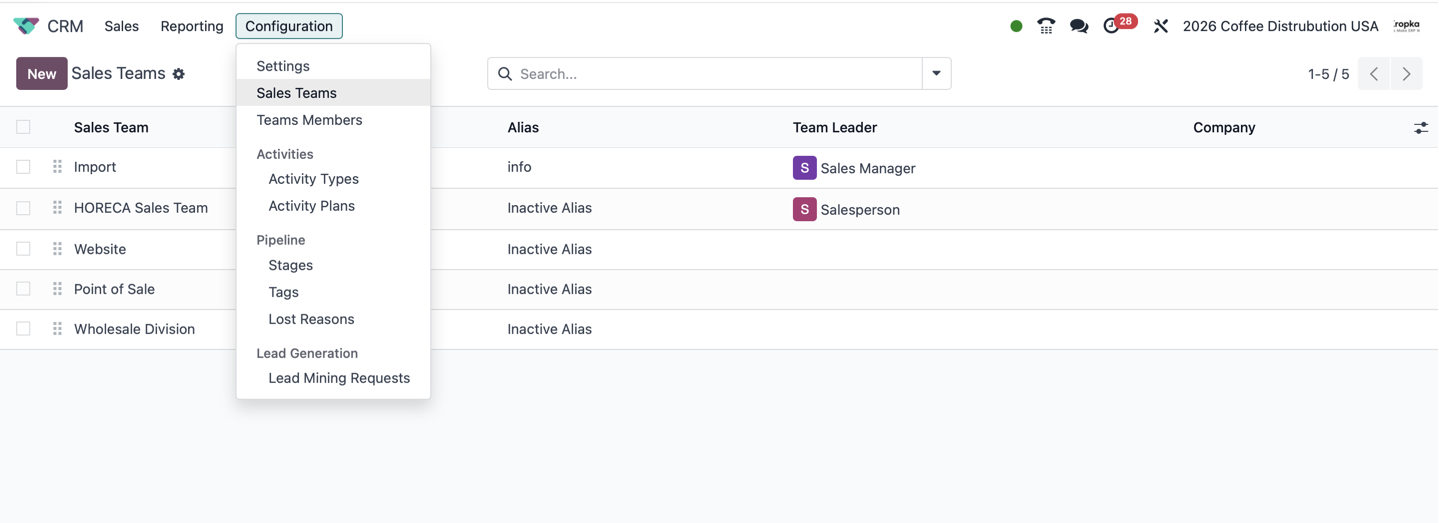
3. Organise Sales Teams
Sales teams allow you to organise ownership and use team-specific stages where appropriate.
Consider whether different types of sales need different processes. Selling directly to end customers may differ from selling through partners. Premium accounts may also require a different approach.
Separate teams where there is a practical difference in responsibility or workflow.
This makes reporting more meaningful. For example, mixing partner sales and direct customer sales may hide important differences in their sales cycles and outcomes.
If work moves between teams, decide how the handover will happen and how it will be recorded.
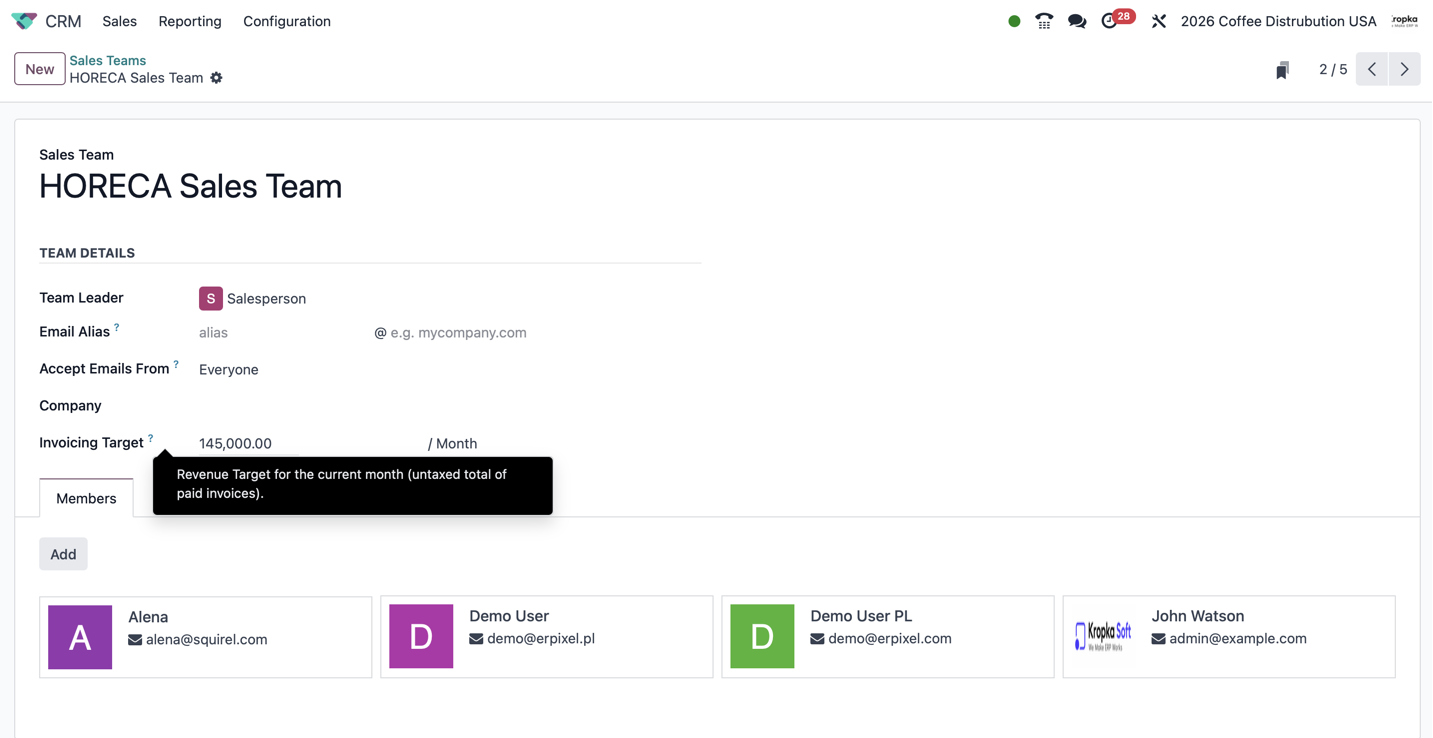
4. Define Assignment and Notifications
Decide who receives each new enquiry.
Review how the Salesperson field will be populated, what notification the responsible person receives, and how reassignment should work.
Where necessary, add another notification channel, such as Telegram, and a controlled transfer process between teams.
Also decide what acknowledgement the customer should receive when their enquiry arrives.
These decisions help ensure that registering a lead leads to actual work on it.
5. Record Source, Medium, and Campaign
If you acquire leads through advertising, preserve the information that explains where they came from.
Odoo’s source, medium, and campaign fields support this attribution.
At ERPixel, we implement integrations that bring enquiries from advertising channels into Odoo with the relevant form and campaign information.
We also implement feedback flows to platforms such as Meta and Google Ads, using supported conversion events to communicate meaningful outcomes, such as qualification or a won sale. We can record lost outcomes in the CRM and include them in external feedback where the receiving system supports the relevant event and its intended use.
Which events can be sent and used for optimisation depends on the platform and integration.
The objective is to connect advertising activity with what happens later in the sales process. This is a recurring part of our work, and we recommend addressing it when implementing an advertising-driven CRM workflow.
6. Connect Telephony and Review Call Quality
For teams that sell by phone, I recommend connecting telephony to the CRM workflow.
The aim is to keep useful call information connected to the customer relationship and make follow-up easier.
At ERPixel, our work includes VoIP integration, call analytics, and AI-assisted call analysis. These implementations help teams review what the customer wanted, how the salesperson handled the conversation, and what should happen next.
Over a large number of conversations, this can also support a better understanding of what the team sells, how it sells, and what customers are actually asking for.
The required setup depends on your phone system, recording arrangements, and business process.
7. Review Customer Enrichment
Odoo offers standard lead enrichment functionality, subject to its configuration and service requirements.
We also offer our own enrichment module at ERPixel. It gathers business information from multiple public sources, including company websites, official company sources, and European VAT information where relevant.
Depending on the customer’s location and the available information, our process can consult around 20 sources.
In our experience, this broader approach provides useful context for the workflows we implement. The purpose is to help the salesperson understand who they are speaking to and prepare for a more useful conversation.
8. Agree on Activities and Loss Reasons
Review the activity types your team will use and define what should happen after common events, such as an initial call, a demonstration, or sending a quotation.
Also define meaningful loss reasons and make recording them part of the closing process.
Consistent activities and outcomes give managers a better basis for reviewing the team’s work and identifying where the sales process needs attention.
Odoo Enterprise and Odoo Community
The workflow described here is based on our experience with Odoo Enterprise.
However, leads, opportunities, stages, salesperson ownership, and the core CRM workflow are also relevant to Odoo Community. In our experience, the two editions are closely aligned in these core CRM concepts.
This does not mean every surrounding application, communication channel, enrichment service, or reporting option is identical. Those details depend on the edition, version, installed modules, and configured services.
Our integrations support both Odoo Community and Odoo Enterprise, with the appropriate installation and configuration for the environment.
For a wider discussion of the differences, see my Odoo ERP overview and comparison of Odoo Community and Odoo Enterprise.
My View of Odoo CRM
For me, Odoo CRM is valuable because it connects the customer conversation to the next action and, eventually, to the rest of the business.
A lead gives you a place to qualify an enquiry. An opportunity represents a potential sale. The salesperson owns the work. Stages show where that sale stands. Chatter preserves the conversation. Activities organise the actions needed to move it forward. Quotations connect the conversation to a commercial offer.
These records become useful when the team follows clear rules: what counts as qualified, what each stage means, when a deal is won or lost, and who is responsible for the next step.
When advertising attribution, communication channels, and sales outcomes are connected, the company can follow the complete journey from an incoming enquiry to a successful sale.
Start with that working process. Then add the integrations and automation that support how your team actually sells.
If you would like help configuring Odoo CRM, connecting your acquisition channels or telephony, or implementing enrichment and AI-assisted workflows, contact ERPixel. We would be happy to answer your questions, discuss how your team works with customers, and help you organise that process in Odoo.